

CSS Minifier Pro
Optimize and compress your CSS code with our advanced minification tool
Drag & drop your CSS file here
or paste your code directly
Supports: .css files (UTF-8 encoding)
- Upload a CSS file or paste your code directly into the input area
- Check "Preserve /*! ... */ comments" to keep important license comments
- Use Ctrl+Enter (Cmd+Enter on Mac) to quickly minify your CSS
- Download the minified CSS or copy it to your clipboard
- All processing happens locally in your browser - no server required
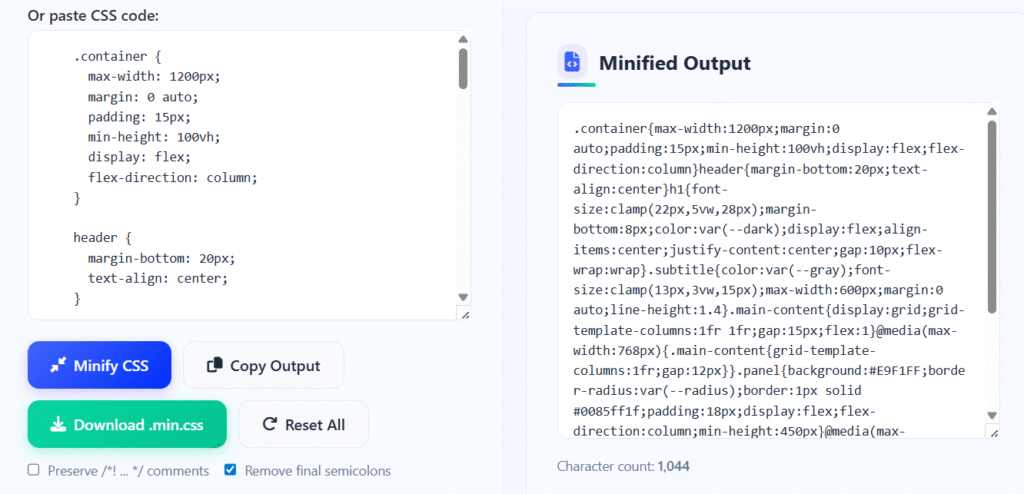
What is CSS Minifier Pro?
The CSS Minifier Pro is an advanced web-based tool designed to optimize and compress Cascading Style Sheets (CSS) files by removing unnecessary characters, whitespace, and redundant code. This powerful utility significantly reduces file sizes while maintaining full functionality, resulting in faster website loading times and improved performance.
Unlike basic compression tools, our minifier offers intelligent optimization features including selective comment preservation, last semicolon removal, character encoding normalization, and detailed compression statistics. This makes it perfect for production environments where every kilobyte counts and performance optimization is critical.
This essential tool is built for web developers, frontend engineers, performance specialists, and anyone working with CSS optimization. Whether you're deploying a high-traffic website, optimizing a web application, or simply trying to improve your page load speeds, our CSS Minifier Pro provides professional-grade compression with complete control over the optimization process.
With its real-time compression statistics, visual progress indicators, and multiple export options, the CSS Minifier Pro transforms complex optimization tasks into simple, efficient workflows that anyone can master, ensuring your stylesheets are always performance-optimized and production-ready.
How to Use CSS Minifier Pro
Upload or Paste CSS
Upload your CSS file via drag-and-drop or file selection, or simply paste your CSS code directly into the input area. The tool supports all standard CSS files with UTF-8 encoding, and provides immediate feedback on file size and character count.
Configure Optimization Options
Choose your optimization preferences: preserve important comments (/*! ... */), remove final semicolons, and select encoding options. These settings allow you to balance maximum compression with necessary preservation of license headers and critical annotations.
Initiate Minification
Click the "Minify CSS" button or use the Ctrl+Enter keyboard shortcut to begin optimization. The tool processes your CSS in milliseconds, removing all unnecessary whitespace, comments (except preserved ones), and redundant characters while maintaining perfect syntax integrity.
Export Optimized Code
Copy the minified CSS directly to your clipboard, download it as a .min.css file, or continue editing. The tool provides detailed compression statistics showing exactly how much space you've saved, with visual progress bars for immediate feedback.
Key Features
Pro Tips for Maximum CSS Optimization
- Always preserve /*! ... */ comments for licenses, attribution, and critical notes that must remain in production
- For maximum compression, enable "Remove final semicolons" and disable comment preservation
- Use the keyboard shortcut Ctrl+Enter (Cmd+Enter on Mac) for quick minification without reaching for the mouse
- Before minifying, consider organizing your CSS to group related rules and remove any unused styles
- For large CSS files, minify in sections to verify the output maintains functionality
- Always test minified CSS in a staging environment before deploying to production
- Combine CSS minification with Gzip/Brotli compression on your server for additional size reduction
- Use source maps in development to maintain debuggability while using minified CSS in production
- Consider CSS bundling multiple files together before minification for optimal compression
- Regularly audit your CSS for unused rules that can be removed entirely before minification
Frequently Asked Questions
CSS minification is the process of removing all unnecessary characters from CSS code without changing its functionality. This includes: Whitespace elimination - removing spaces, tabs, and line breaks; Comment stripping - removing developer comments (while optionally preserving important ones); Redundant character removal - eliminating unnecessary semicolons and units; Optimization - shortening color values and other optimizations. The goal is to reduce file size for faster download times while maintaining identical rendering behavior. Minified CSS is functionally identical to the original but significantly smaller, leading to improved website performance and better user experience.
When done correctly, CSS minification should not break your website. Our tool is designed to: Preserve syntax integrity - all CSS rules remain functionally identical; Maintain selector specificity - no changes to selector hierarchy or specificity; Keep property values intact - all values remain unchanged except for optimizations like color shortening; Preserve important rules - !important declarations remain untouched. However, it's always recommended to: Test minified CSS in a staging environment first; Keep backups of your original CSS files; Use source maps for debugging in development; Validate the output if you have complex or unconventional CSS syntax. The minification process is safe for standard CSS, but testing is always advised.
Minification and compression are complementary but distinct processes: Minification removes unnecessary characters from source code (whitespace, comments, etc.) and is performed at the code level. Compression (like Gzip or Brotli) encodes data more efficiently at the byte level and is performed by web servers. For optimal performance: First minify your CSS to remove redundant characters; Then compress with Gzip/Brotli on your server; Combined approach yields the smallest file sizes; Browser support - minified CSS works everywhere, compression requires server configuration. Our tool handles minification, which typically achieves 20-60% size reduction, while server compression can provide additional 50-80% reduction on top of minification.
Whether to preserve comments depends on their purpose: Preserve /*! ... */ comments - these often contain licenses, attribution, or critical notes that must remain; Remove regular comments - developer notes, TODOs, and explanations can safely be removed; Consider legal requirements - some licenses require attribution to remain; Development vs production - keep comments in development files, remove in production. Our tool provides an option to preserve important comments (wrapped in /*! ... */) while removing all others. This approach: Maintains legal compliance for licensed code; Keeps attribution for open-source components; Removes clutter from production code; Follows best practices for professional CSS deployment.
File size reduction from CSS minification varies based on several factors: Original code quality - well-formatted CSS with comments yields higher savings; Comment density - CSS with many comments saves more when they're removed; Whitespace usage - heavily indented code compresses more; Property optimization - opportunities for value shortening. Typical reductions: 20-40% for average CSS files; 40-60% for well-commented, well-formatted CSS; 10-20% for already optimized CSS; Additional 50-80% when combined with Gzip/Brotli compression. Our tool provides real-time statistics showing exact savings, so you can see immediate results for your specific CSS.
Our tool handles standard CSS syntax perfectly, but considerations for special cases: Sass/SCSS/Less - minify the compiled CSS output, not the source files; CSS Custom Properties (variables) - fully supported and preserved; CSS Grid/Flexbox - syntax remains intact; Vendor prefixes - preserved exactly as written; Media queries - fully supported with all syntax; CSS Functions - calc(), var(), rgba(), etc. are preserved. For preprocessor output: Compile first then minify the resulting CSS; Test thoroughly as some edge cases may differ; Consider source maps to maintain debuggability. The tool is optimized for production-ready CSS, which is typically the output of build processes.
Yes, removing the last semicolon before a closing brace is completely safe in CSS: CSS specification - semicolons separate declarations, they don't terminate them; Browser parsing - all modern browsers handle missing final semicolons correctly; Performance - no impact on rendering or functionality; Best practice - removing them saves a small amount of space per rule. However: Consistency matters - either remove all final semicolons or keep them all; Legacy considerations - extremely old browsers might have issues, but these are virtually non-existent today; Readability - in development, keep semicolons for clarity; in production, remove them for optimization. Our tool provides this as an option, and it's generally safe to enable for production CSS.
CSS minification significantly improves website performance in several ways: Faster downloads - smaller files transfer more quickly; Reduced bandwidth - less data used per page load; Faster parsing - browsers parse minified CSS slightly faster; Better caching - smaller files cache more efficiently; Improved Core Web Vitals - contributes to better LCP (Largest Contentful Paint) scores. Performance impact: Loading time - 20-60% reduction in CSS file size translates to faster loading; Mobile users - particularly beneficial on slower mobile connections; Cumulative effect - when combined with other optimizations (image compression, JS minification, etc.); SEO benefits - Google considers page speed in rankings. Every kilobyte saved contributes to better performance.
Absolutely! While our web tool is great for one-off minification, automation is recommended for production workflows: Build tools - integrate minification into Webpack, Gulp, Grunt, or Parcel; Task runners - automate as part of your deployment pipeline; CI/CD pipelines - include minification in your continuous integration process; Pre-commit hooks - automatically minify before commits. Popular automation tools: cssnano - advanced CSS optimization tool; clean-css - efficient CSS minifier; PostCSS plugins - integrate with PostCSS build pipelines; Framework integrations - built into React, Vue, Angular build processes. Our tool is perfect for learning, testing, and occasional use, while automated solutions are better for regular production workflows.
Yes, your CSS code is completely secure when using our tool: Client-side processing - all minification happens locally in your browser using JavaScript; No server transmission - your CSS never leaves your computer; No data storage - we don't store, analyze, or have access to your code; Privacy focused - ideal for proprietary or sensitive CSS; Offline capability - once loaded, the tool works without internet connection. This approach ensures: Maximum privacy - your intellectual property remains yours; No network latency - processing is instant; No data leaks - perfect for confidential projects; Complete control - you can even save the page locally for permanent offline access. Your CSS processing remains entirely between you and your device.