

URL Slug Generator
Create clean, SEO friendly URL slugs automatically
Separator
Text Options
Length Control
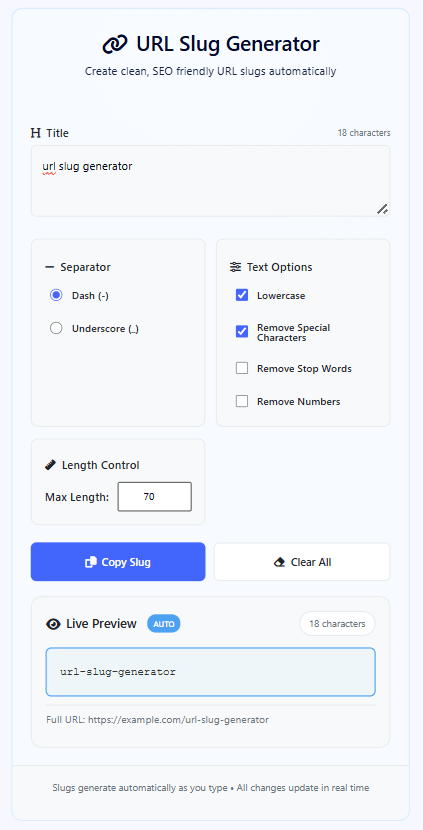
What is URL Slug Generator?
The URL Slug Generator is a powerful web-based tool designed to transform titles and headings into clean, SEO-friendly URL slugs automatically. This intelligent tool processes text in real-time, applying multiple optimization options to create perfect slugs for websites, blogs, and content management systems.
Unlike basic slug generators, our tool offers six configurable optimization options that can be combined for different results: separator selection (dash/underscore), lowercase conversion, special character removal, stop word elimination, number removal, and length control. This flexibility makes it suitable for various SEO and content management needs.
This tool is essential for SEO specialists, content creators, bloggers, web developers, and digital marketers who need clean, readable URLs. Whether you're creating blog posts, product pages, documentation, or any web content, our tool provides the precise control you need to generate optimal slugs.
With its real-time processing, live preview, and multiple customization options, the URL Slug Generator streamlines URL creation workflows, saving time and ensuring consistency across your website's URL structure.
How to Use Our URL Slug Generator
Enter Your Title
Type or paste your title, heading, or text into the input area. The text can come from any source - blog drafts, product names, article titles, or page headings. The tool automatically analyzes your text and displays character count while generating the slug in real-time.
Configure Slug Options
Select the optimization options that match your needs. Choose between dash or underscore separators, enable lowercase conversion, remove special characters, eliminate stop words (like "the", "and", "or"), remove numbers, and set maximum length. Options can be combined for custom results.
Preview and Optimize
Watch the slug generate automatically as you type. The live preview shows exactly how your slug will appear in URLs. Adjust options in real-time to optimize for SEO, readability, or specific platform requirements. The full URL preview helps visualize the final result.
Copy and Use
Click "Copy Slug" to copy the generated slug to your clipboard. Use it directly in your CMS, website, or any platform requiring URL slugs. Use the "Clear All" button to reset and start fresh with new text.
Optimization Options Explained
Best Practices for URL Slugs
- Use dash (-) separators instead of underscores for better SEO performance
- Keep slugs under 70 characters for optimal readability and search engine indexing
- Include primary keywords at the beginning of the slug when possible
- Avoid dates and numbers unless they're essential to the content's identity
- Use lowercase consistently to prevent duplicate content issues
- Remove stop words for more concise, keyword-dense slugs
- Test different option combinations to find the optimal balance between readability and SEO
Frequently Asked Questions
A URL slug is the part of a URL that identifies a specific page or post in a human-readable format. For example, in "https://example.com/blog/what-is-seo", "what-is-seo" is the slug. Slugs are important because they: Improve SEO by including keywords; Enhance user experience by making URLs readable and memorable; Increase click-through rates when shared; Help with site organization and navigation. A well-optimized slug can significantly impact your content's discoverability and engagement.
Dashes (-) are generally better for SEO than underscores (_). Search engines like Google treat dashes as word separators, meaning "what-is-seo" is indexed as three separate words: "what", "is", and "seo". Underscores, however, are often treated as connectors, so "what_is_seo" might be indexed as a single word "whatisseo". For optimal SEO performance, use dashes. However, if you're working with a system that already uses underscores or have specific technical requirements, underscores are acceptable but not ideal for SEO.
Yes, removing stop words is generally recommended for URL slugs. Stop words (like "a", "an", "the", "and", "or", "but") don't add SEO value and make URLs longer. For example, "the-ultimate-guide-to-seo" becomes "ultimate-guide-seo" after stop word removal - more concise and keyword-focused. However, consider readability: if removing a stop word makes the slug confusing or changes its meaning, you might want to keep it. Our tool gives you the option to toggle stop word removal so you can choose what works best for each specific case.
The ideal URL slug length is 3-5 words or 50-70 characters. Shorter slugs are more memorable, easier to share, and generally perform better in search results. Very long slugs (over 100 characters) may be truncated in search results and are harder for users to read and remember. Our tool includes length control with a default maximum of 70 characters, which is a good balance between including keywords and maintaining readability. For specific content types: Blog posts: 5-7 words; Product pages: 3-5 words; Category pages: 2-3 words.
The tool handles non-English languages intelligently. For languages using Latin alphabet with diacritics (like é, ñ, ü), these are converted to their base letters (e, n, u) when "Remove Special Characters" is enabled. For non-Latin scripts (like Arabic, Chinese, Cyrillic), the tool preserves the characters but removes actual punctuation and symbols. However, note that for optimal SEO and compatibility, it's generally recommended to use English slugs or transliterated versions of non-English words. Some special characters that are URL-safe (like ~, ., ,) are preserved unless they conflict with URL syntax.
Generally, avoid including dates in URL slugs unless they're essential to the content's identity. Dates make content appear outdated quickly and reduce the evergreen nature of your URLs. For example, instead of "blog/2023-10-15/seo-tips-2023", use "blog/seo-tips". Exceptions include: News articles where timeliness is crucial; Event pages with specific dates; Annual reports or year-specific content. If you must include dates, place them at the beginning or end of the slug rather than in the middle, and use our "Remove Numbers" option to easily exclude them when not needed.
Yes, but with caution regarding redirects. You can paste existing URLs into the tool, extract the slug portion, and regenerate an optimized version. However, if you change an existing URL slug on a live website, you must implement a 301 redirect from the old URL to the new one. This preserves SEO value and prevents broken links. Our tool is excellent for planning URL migrations or optimizing slugs for new content. For existing content, use the tool to generate the optimal slug, then work with your developer or use your CMS's redirect features to implement the change properly.
The tool automatically converts everything to lowercase when the "Lowercase" option is enabled (which is default and recommended). This is important because URLs are case-sensitive in some systems but not in others, leading to potential duplicate content issues. For example, "What-Is-SEO" and "what-is-seo" might be treated as different pages by some servers. By enforcing lowercase, you ensure consistency and prevent technical SEO issues. Even if your input has mixed case or all caps, the output will be consistently lowercase, making your URLs predictable and avoiding canonicalization problems.
Stop words are common words that search engines typically ignore because they occur too frequently to be useful for search queries. Our tool removes English stop words including: Articles (a, an, the); Conjunctions (and, or, but); Prepositions (in, on, at, to, for, of, with, by); Common verbs (is, are, was, were, be, been, have, has, had); Auxiliary verbs (do, does, did, will, would, could, should, may, might, must, can); Question words (what, which, who, whom, whose, how, when, where, why). The list includes about 50 common English stop words that don't add SEO value to URLs.
Balance is key. Ideal slugs include primary keywords while remaining concise. Include 1-3 primary keywords that accurately describe the content. For example, for an article about "Best SEO practices for e-commerce websites", a good slug would be "seo-practices-ecommerce" (keywords: seo, practices, ecommerce). Avoid keyword stuffing like "best-seo-tricks-practices-methods-ecommerce-websites-online-stores". Shorter slugs (3-5 words) perform better for memorability and sharing. Longer slugs with 6+ words can still rank well if they're descriptive and not stuffed with keywords. Use our length control to experiment with different balances.