

Color Contrast Checker
Ensure your color combinations meet WCAG 2.1 accessibility standards
Color Selection
Quick Presets
History
Color Harmonies
Live Preview
Color Blindness Simulation
See how your color combination appears to people with different types of color vision deficiency.
Better Alternatives
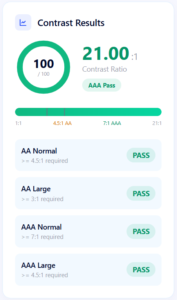
Contrast Results
What is a Color Contrast Checker?
The Color Contrast Checker is a free online tool that tests whether your text and background color combinations meet WCAG 2.1 AA and AAA accessibility standards. Instantly see the contrast ratio, pass/fail results, and get accessible color suggestions in real time.
Whether you're a web designer, developer, or accessibility specialist, this website contrast checker helps you create readable, inclusive designs without installing any software. As an accessibility colour checker, it covers everything from basic text contrast to dark mode combinations and color blindness simulation.
Ensure your color combinations meet WCAG 2.1 accessibility standards. Test any text and background pair instantly and get accessible alternatives.
How to Use Our Color Contrast Checker
Pick Foreground Color
Choose your text color with the color picker or hex input.
Pick Background Color
Select your background color using the color picker or hex input.
See Instant Results
The web contrast checker calculates the WCAG ratio in real time as you adjust colors.
Check Compliance
See if your combination passes AA or AAA standards for both normal and large text.
Get Better Alternatives
Click any suggested color to instantly improve contrast.
Understanding WCAG Contrast Standards
| Standard | Normal Text | Large Text |
|---|---|---|
| AA | ≥ 4.5:1 | ≥ 3:1 |
| AAA | ≥ 7:1 | ≥ 4.5:1 |
Large text is 18pt+ (24px) or 14pt+ bold (18.66px). Our color contrast checker automatically evaluates both normal and large text, so you always know where your design stands.
Who Is This Color Contrast Checker For?
- Web designers – ensure readable typography on any background
- Front-end developers – test color combinations before deployment
- Accessibility specialists – verify WCAG 2.1 compliance
- UI/UX designers – build inclusive color systems
- Content creators – check text readability in presentations
- Students – learn accessibility best practices
Whether you're checking a single button or a full design system, this web contrast checker gives you fast, accurate results — free and online.
Color Blindness Simulation
Our accessibility colour checker includes a color blindness simulator covering:
See how your color combination appears to users with different types of color vision deficiency — and fix any issues before launch.
Pro Tips for Better Contrast
- Test both normal and large text sizes separately
- Use the color blindness simulation to check accessibility
- Copy CSS, Tailwind, or Figma tokens directly to your project
- Check dark mode combinations independently
- Aim for AAA when possible — it's the best user experience
- Use preset combinations to start with proven color pairs
Frequently Asked Questions
WCAG AA requires a minimum of 4.5:1 for normal text and 3:1 for large text. AAA requires 7:1 for normal text and 4.5:1 for large text. Our color contrast checker shows you the exact ratio and the WCAG level your combination achieves.
Simply pick your foreground and background colors in the tool above. This website contrast checker calculates the ratio instantly and shows whether your combination passes WCAG AA or AAA standards.
AA is the standard compliance level required by most accessibility laws (like ADA and Section 508). AAA is stricter, offering higher contrast for better readability. Most websites aim for AA at minimum, while government and healthcare sites often target AAA.
Yes. Test any color combination, including dark backgrounds with light text. This web contrast checker works identically for light and dark themes — just swap the colors.
Absolutely. WCAG contrast standards apply to any digital interface — websites, mobile apps, and desktop software. Our accessibility colour checker works on any device with a modern browser.
WCAG (Web Content Accessibility Guidelines) is the international standard for web accessibility. Meeting WCAG contrast requirements helps you:
- Comply with accessibility laws (ADA, Section 508, EN 301 549)
- Reach a wider audience including users with low vision
- Improve SEO and overall UX
Yes. All calculations happen locally in your browser. No color data is transmitted or stored on our servers. Your designs stay private.
Yes. Our accessibility colour checker includes simulation for protanopia, deuteranopia, tritanopia, and achromatopsia — so you can verify your colors work for users with color vision deficiency.
Yes. Copy your results as CSS, Tailwind classes, Figma colors, or design tokens (JSON) with a single click — ready to paste into your project.