

Caesar Cipher Pro
Advanced encryption tool with multiple alphabets, frequency analysis, and real time preview
What is Caesar Cipher Pro?
The Caesar Cipher Pro is an advanced, web-based cryptographic tool designed for exploring and understanding one of the oldest and most famous encryption techniques in history. This sophisticated utility goes beyond basic Caesar cipher implementation by offering multiple alphabets, frequency analysis, automatic shift detection, and educational features for both beginners and cryptography enthusiasts.
Unlike basic cipher tools, our application offers four alphabet configurations and custom alphabet support: Standard English (A-Z, a-z), uppercase only, lowercase only, and fully customizable alphabets. This flexibility allows users to experiment with different character sets and understand how substitution ciphers work across various languages and systems.
This tool is essential for students, cryptography enthusiasts, puzzle solvers, educators, and security professionals who want to understand classical cryptography. Whether you're learning about encryption basics, solving historical ciphers, creating educational materials, or exploring cryptographic concepts, our tool provides both practical functionality and educational insights.
With its real-time frequency analysis, automatic shift detection with confidence scoring, alphabet visualization, and comprehensive history tracking, Caesar Cipher Pro transforms a simple historical cipher into a powerful educational platform for understanding cryptographic principles and techniques.
How to Use Caesar Cipher Pro
Input Your Text
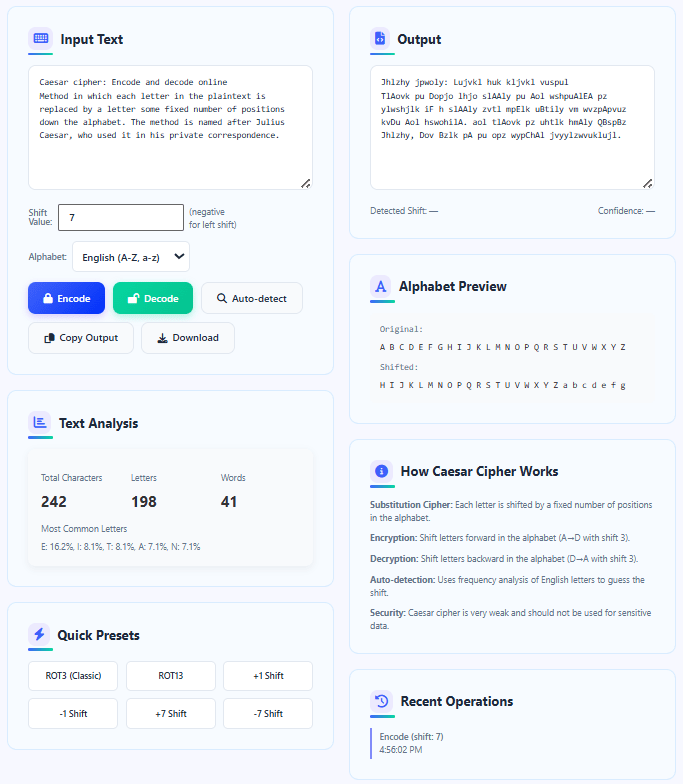
Enter the text you want to encrypt or decrypt in the input area. The tool automatically analyzes your text, showing character count, letter count, word count, and the most frequent letters. This analysis helps understand the text's characteristics before encryption.
Configure Encryption Parameters
Set the shift value (positive for right shift, negative for left shift) or use preset values like ROT3 (classic Caesar), ROT13, or other common shifts. Choose your alphabet type: standard English (case-sensitive), uppercase only, lowercase only, or define a custom alphabet for specialized applications.
Perform Encryption/Decryption
Click "Encode" to encrypt your text using the specified shift. Click "Decode" to decrypt previously encrypted text. Use "Auto-detect" for automatic shift detection based on frequency analysis - the tool analyzes letter frequencies and suggests the most likely shift with confidence percentage.
Analyze and Export Results
Review the encrypted/decrypted output. Use the alphabet preview to visualize the substitution mapping. Copy results to clipboard or download as text file. Track your operations in the history panel. Analyze frequency patterns to understand how different shifts affect letter distributions.
Advanced Features Explained
Cryptographic Best Practices
- Understand that Caesar cipher is a historical/educational tool only and provides no real security
- For actual encryption needs, use modern algorithms like AES-256, RSA, or ChaCha20
- When using custom alphabets, ensure no duplicate characters and maintain consistent order
- For frequency analysis to work effectively, use sufficient text length (minimum 50-100 characters)
- Remember that case sensitivity affects security - case-sensitive alphabets have larger key space
- Use auto-detection as a starting point for cryptanalysis, not as definitive solution
- Always verify decryption results manually when security matters, even with high confidence scores
Frequently Asked Questions
The Caesar cipher is a substitution cipher where each letter in the plaintext is shifted a fixed number of positions down or up the alphabet. Mathematically: Encryption: E(x) = (x + n) mod 26; Decryption: D(x) = (x - n) mod 26 where x is the letter position (A=0, B=1, ..., Z=25) and n is the shift amount. For example, with shift 3: A→D, B→E, C→F, ..., X→A, Y→B, Z→C. The cipher is named after Julius Caesar, who reportedly used it with a shift of 3 to protect military messages. Our tool implements this mathematically, handling both positive (right shift) and negative (left shift) values, with modulo arithmetic ensuring the alphabet wraps around correctly.
The automatic shift detection uses frequency analysis and has accuracy that depends on several factors: Text length - More text (100+ characters) yields higher accuracy; Language characteristics - Works best with English text following standard letter frequencies; Shift value - Some shifts are harder to detect than others; Text content - Technical/specialized vocabulary may reduce accuracy. Typical accuracy: 50+ characters: 70-80% confidence; 100+ characters: 85-95% confidence; 200+ characters: 95%+ confidence. The confidence percentage indicates how closely the shifted text matches expected English frequencies. Always verify results manually, especially for important or sensitive texts.
Our tool offers four alphabet modes: English (A-Z, a-z) - Case-sensitive, 52 characters, most flexible but larger key space; English uppercase only - 26 characters, case-insensitive, standard implementation; English lowercase only - 26 characters, case-insensitive; Custom alphabet - User-defined characters in any order. Use case-sensitive mode for: Modern implementations where case matters; Educational demonstrations of larger key spaces. Use case-insensitive mode for: Historical accuracy (original Caesar cipher was case-insensitive); Simpler cryptanalysis. Use custom alphabet for: Non-English languages; Specialized character sets; Educational experiments with different alphabets. Each mode affects both the encryption process and the cryptanalysis difficulty.
Caesar cipher is cryptographically weak for several reasons: Small key space - Only 25 possible shifts (26 if including 0); Vulnerable to frequency analysis - Letter frequency patterns are preserved; No diffusion/confusion - Each letter encryption is independent; Deterministic - Same plaintext always produces same ciphertext; Known-plaintext attacks - One known plaintext-ciphertext pair reveals the key; Brute-force trivial - All possible keys can be tested quickly. Compared to modern encryption: AES-256 has 2^256 possible keys vs Caesar's 25; Modern ciphers have diffusion (each bit affects many output bits); Current standards resist known cryptographic attacks. Caesar cipher is only suitable for: Educational purposes; Simple obfuscation (not encryption); Historical recreation; Basic puzzles.
ROT13 (rotate by 13 places) is a special case of Caesar cipher with several unique properties: Self-reciprocal - Encryption and decryption use the same operation (ROT13(ROT13(text)) = text); Symmetrical shift - 13 is exactly half of 26, so applying twice returns to original; Common usage - Historically used to hide spoilers, punchlines, or offensive content; No security - Even weaker than general Caesar cipher since there's only one possible "key". ROT13 is useful for: Simple obfuscation where casual viewers shouldn't read content easily; Educational demonstrations of self-reciprocal ciphers; Online forums to hide spoilers. Unlike other shifts, ROT13 doesn't require separate encryption/decryption functions - the same operation works both ways.
Frequency analysis exploits the fact that letter frequencies in natural language are non-uniform and predictable. In English: E is most common (~12.7%); T, A, O, I, N, S, H, R are next most common; Z, Q, X, J are rarest. To break a Caesar cipher: Count letter frequencies in ciphertext; Compare with expected frequencies; Test different shifts to find which makes ciphertext frequencies match English frequencies; Look for patterns like common digrams (TH, HE, IN, ER, etc.). Our tool automates this process by: Calculating frequencies in real-time; Computing correlation scores for each possible shift; Recommending the most likely shift with confidence score. Longer texts yield more accurate frequency analysis.
Yes, custom alphabets support any characters including non-English, numbers, symbols, or mixed sets. Important considerations: Character order matters - The sequence defines how shifts work; No duplicates allowed - Each character should appear only once; Case sensitivity - 'A' and 'a' are different characters if both included; Unicode support - Most Unicode characters work, but visual rendering may vary by browser. Example custom alphabets: Spanish - "ABCDEFGHIJKLMNÑOPQRSTUVWXYZ"; German - "ABCDEFGHIJKLMNOPQRSTUVWXYZÄÖÜß"; Russian - "АБВГДЕЁЖЗИЙКЛМНОПРСТУФХЦЧШЩЪЫЬЭЮЯ"; Alphanumeric - "0123456789ABCDEFGHIJKLMNOPQRSTUVWXYZ". Frequency analysis works best when you know the language's letter frequency distribution.
ROT3 (shift of 3) is specifically what Julius Caesar reportedly used, making it the "original" Caesar cipher. However: Historical accuracy - Ancient sources mention Caesar used a shift but don't specify 3; Modern convention - ROT3 became the standard example; Mathematical equivalence - ROT3 is just one of 25 possible Caesar ciphers; Cultural significance - ROT3 is most recognized as "the" Caesar cipher. All Caesar ciphers work the same mathematically - only the shift amount differs. ROT3 has no special cryptographic properties compared to other shifts. In our tool, ROT3 is included as a preset because of its historical and educational significance, but it's cryptographically identical to any other specific shift value - just with different letter mappings.
This tool is excellent for cryptography education: Visual demonstrations - Show alphabet shifting in real-time; Frequency analysis practice - Students can see how letter frequencies help break ciphers; Key space exploration - Demonstrate limited keyspace (only 25 shifts); Comparative analysis - Show why modern ciphers are more secure; Hands-on exercises - Encrypt/decrypt messages between students; Custom alphabet projects - Create ciphers for different languages; Historical context - Connect to Julius Caesar and ancient cryptography; Security principles - Illustrate why simple substitution is insecure. Suggested classroom activities: Cipher challenges - Students encrypt messages for others to decrypt; Cryptanalysis contests - Who can break an unknown shift fastest; Frequency collection - Analyze different text samples; Modern comparison - Contrast with AES or RSA demonstrations.
While not suitable for real security, Caesar cipher has some practical uses: Educational tool - Teaching basic cryptography concepts; Simple obfuscation - Hiding content from casual viewers (like ROT13 for spoilers); Puzzles and games - Escape rooms, puzzle hunts, recreational cryptography; Historical recreation - Understanding ancient communication methods; Programming exercises - Common beginner programming project; Data encoding - Simple transformation for non-security purposes; Steganography complement - Combined with hiding techniques for basic secrecy. Important distinction: Obfuscation ≠ encryption - Caesar cipher obfuscates but doesn't truly encrypt for security. For any actual sensitive data, use modern encryption like AES-256, not historical ciphers.