

Screen Resolution Detector
What is Screen Resolution Detector?
The Screen Resolution Detector is a free online tool that tests your display configuration in real-time. Instantly check your screen resolution, pixel density (PPI), aspect ratio, color depth, and multi-monitor setup no installation or sign-up required.
Whether you need a screen resolution test for responsive design, a quick monitor resolution test for a new display, or a screen resolution tester for QA work, this tool gives you accurate results in one click.
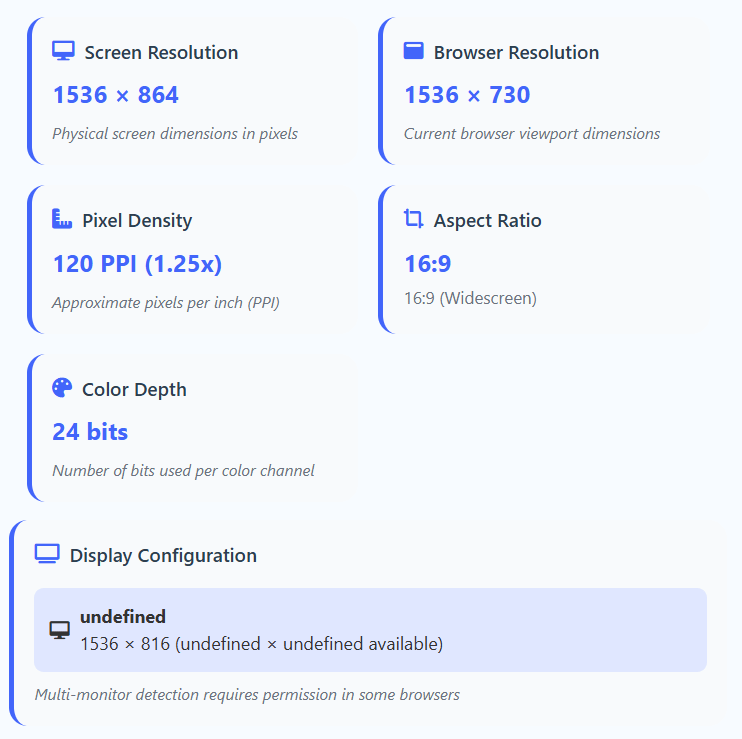
A Screen Resolution Detector is a web-based tool that analyzes your display's physical capabilities. Unlike basic tools, ours provides a comprehensive screen resolution test covering: physical resolution, browser viewport vs screen size, pixel density (PPI), aspect ratio, color depth, and multi-monitor configuration.
This makes it essential for web developers, designers, QA testers, and hardware enthusiasts who need accurate display information.
How to Test Your Screen Resolution
Click "Detect Display"
The tool instantly starts analyzing your screen configuration with a visual progress indicator.
Review Results
See resolution, viewport, PPI, aspect ratio, and color depth — all displayed in real-time.
Check Multi-Monitor Info
All connected displays are detected and labeled. Primary monitors are highlighted for easy identification.
Resize Your Browser
Watch the viewport update in real-time as you resize your browser window. The tool automatically recalculates and displays current browser resolution.
Key Information Detected
💡 Use the reset button to clear results and run a fresh screen resolution test.
Who Is This Screen Resolution Tester For?
- Web developers – test responsive layouts across screen sizes
- UI/UX designers – verify designs on different displays
- QA testers – check display compatibility
- Hardware enthusiasts – analyze monitor specs
- Students – understand display technology
Whatever your use case, this monitor resolution test tool gives you accurate, instant results — free and online.
Pro Tips for Best Results
- Run a screen resolution test when setting up a new display
- Compare screen resolution vs browser viewport for responsive design
- Check PPI to optimize images for Retina and high-DPI screens
- Resize your browser window to see live viewport updates
- Works best in modern browsers with full Web API support
Frequently Asked Questions
Screen resolution is the total physical pixels your display can show (e.g., 1920×1080). Browser viewport is the visible area inside your browser window, which is smaller due to toolbars and window size. Our screen resolution test shows both.
Common resolutions include 1920×1080 (Full HD), 2560×1440 (QHD), 3840×2160 (4K), and 5120×2880 (5K). For most users, 1920×1080 is standard, while 2560×1440+ is preferred for design and gaming. Check yours instantly with our screen resolution tester.
Simply open this page and click "Detect Display." Our online screen resolution detector runs entirely in your browser — no download, no extension, no sign-up.
Yes. Our screen resolution tester works on Android, iPhone, iPad, and tablets. It's especially useful for checking high-DPI mobile displays.
Pixel density (Pixels Per Inch) determines how sharp text and images look. Higher PPI displays (Retina, 4K) show more detail but may need scaling. Our tool helps you optimize images and fonts for any display.
Yes, when your browser supports the Screen Details API and you grant permission, our monitor resolution test detects all connected displays and labels the primary one.
Aspect ratio is the width-to-height proportion. Common ratios: 16:9 (widescreen), 4:3 (traditional), 21:9 (ultrawide). Our tool shows the exact ratio and closest standard match.
Our PPI calculation is a close approximation based on standard DPI values (96 for Windows, 72 for Mac) multiplied by device pixel ratio. It's accurate enough for web development and design decisions.
Color depth shows how many colors your display can render. Most modern displays support 24-bit (16.7M colors), while pro displays support 30-bit or higher for accurate color work.
Yes, completely. All detection happens locally in your browser — nothing is transmitted or stored. No cookies, no tracking, no analytics. Your display info stays on your device.
Run it whenever you: set up a new display, change display settings, install new graphics drivers, encounter rendering issues, or test responsive designs. Our tool updates in real-time.