

Hash Generator
Calculate hash values for text and files with multiple algorithms and output formats
Drag & drop a file here or click to browse
Calculation History
What is Hash Generator?
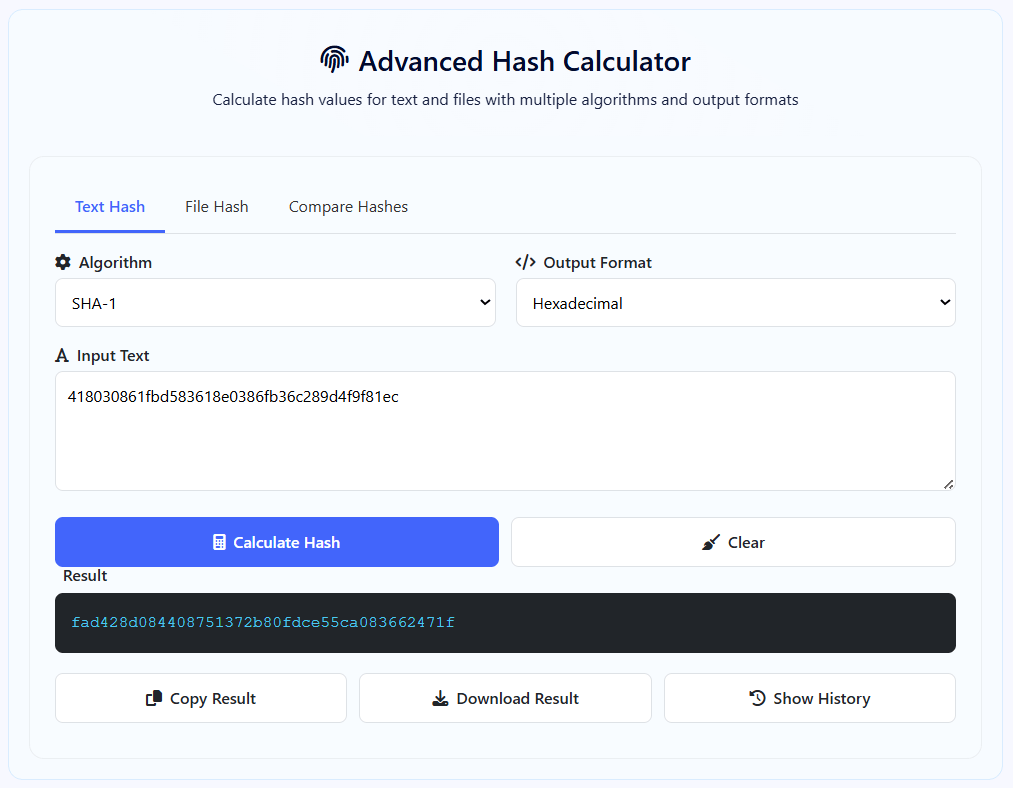
The Hash Generatorr is a sophisticated cryptographic tool designed to compute hash values for both text and files using multiple industry-standard algorithms. This powerful utility provides secure, client-side hashing with real-time processing and comparison capabilities for digital forensics, data integrity verification, and security applications.
Unlike basic hash calculators, our tool offers four SHA cryptographic algorithms with dual output formats: SHA-1 (legacy), SHA-256 (standard), SHA-384, and SHA-512 (high security). Each algorithm provides different security levels and output lengths, allowing users to choose based on their specific security requirements.
This tool is essential for security professionals, developers, system administrators, forensic analysts, and IT specialists who need to verify data integrity, create digital signatures, or compare file authenticity. Whether you're checking file downloads, verifying password hashes, performing forensic analysis, or ensuring data hasn't been tampered with, our tool provides the precise cryptographic capabilities you need.
With its three operational modes (text hashing, file hashing, hash comparison), real-time processing, and comprehensive history tracking, the Advanced Hash Calculator streamlines cryptographic workflows, providing professional-grade hash calculations directly in your browser without compromising security.
How to Use Our Hash Generator
Select Mode
Choose between three operational modes: Text Hash for string data, File Hash for computing hashes of uploaded files, or Compare Hashes to calculate and compare multiple algorithms simultaneously. Each mode offers specialized functionality for different use cases.
Configure Algorithm & Format
Select your preferred hash algorithm (SHA-1, SHA-256, SHA-384, or SHA-512) and output format (Hexadecimal or Base64). For file hashing, choose based on your security requirements - SHA-256 for general use, SHA-512 for maximum security.
Input Data
For text mode: Enter or paste your text. For file mode: Drag & drop or browse to select a file. For comparison mode: Enter text and select two different algorithms to compare. The tool validates input and provides real-time feedback.
Calculate & Analyze
Click "Calculate Hash" to generate the cryptographic hash. Review the result displayed in your chosen format. Use copy/download functions to save results. Access history to review previous calculations. In comparison mode, analyze differences between algorithm outputs.
Hash Algorithms Explained
Cryptographic Best Practices
- For security-critical applications, always use SHA-256 or higher algorithms
- Never use SHA-1 for password storage or digital signatures due to collision vulnerabilities
- When comparing hashes, ensure you're using the same algorithm and format for accurate comparison
- For file integrity verification, always share both the file and its hash using secure channels
- Use hexadecimal format for human readability, Base64 for compact storage/transmission
- Regularly update your hashing algorithms as cryptographic standards evolve
- Consider adding salt to password hashes before calculation to prevent rainbow table attacks
Frequently Asked Questions
A cryptographic hash is a mathematical function that takes input data of any size and produces a fixed-size string of bytes (the hash). Key properties: Deterministic - same input always produces same output; One-way function - cannot reverse from hash to original data; Avalanche effect - tiny input change produces completely different hash; Collision resistant - extremely difficult to find two different inputs with same hash. Our tool uses the Web Crypto API's crypto.subtle.digest() method, which implements standardized cryptographic algorithms directly in the browser, ensuring mathematical correctness and security compliance.
Algorithm selection depends on your use case: General data integrity - SHA-256 (balanced speed/security); Password storage - SHA-256 or SHA-512 with salt (never SHA-1); Digital signatures/certificates - SHA-256 or SHA-384; Blockchain/cryptocurrency - SHA-256; High-security applications - SHA-384 or SHA-512; Legacy system compatibility - SHA-1 (only if absolutely necessary); File verification - SHA-256 for general, SHA-512 for sensitive files. Consider that SHA-256 processes faster than SHA-512 but offers less security margin. Our comparison mode lets you test different algorithms on your specific data.
Hexadecimal represents each byte as two characters (0-9, A-F), producing longer but human-readable output. Example SHA-256: 64 characters. Base64 encodes 3 bytes into 4 ASCII characters, producing shorter output but with special characters. Example SHA-256: 44 characters. Use hexadecimal when: Humans need to read/compare hashes; Storing in databases/text files; Compatibility with systems expecting hex. Use Base64 when: Minimizing storage/transmission size; Embedding in URLs/JSON/XML; Working with systems expecting base64. Both represent the exact same binary hash value, just different encodings. Our tool supports both for maximum flexibility.
SHA-1 is cryptographically broken for security purposes but still has limited non-security uses. Do NOT use SHA-1 for: Password storage; Digital signatures; SSL/TLS certificates; Any security-sensitive application. SHA-1 may be used for: Git version control (already widely deployed); Non-security checksums; Legacy system compatibility (transitioning away); Internal data integrity where collision attacks aren't a concern. Google demonstrated practical SHA-1 collisions in 2017, making it unsuitable for security. Our tool includes SHA-1 primarily for compatibility and educational purposes, with clear warnings about its limitations. Always prefer SHA-256 or higher for new implementations.
File hashing processes the entire file content through the hash algorithm, producing a unique fingerprint. Common use cases: Download verification - Compare hash with publisher's provided hash; Data integrity monitoring - Detect unauthorized file changes; Duplicate detection - Identify identical files regardless of filename; Forensic analysis - Establish file authenticity; Backup verification - Ensure backups match originals; Malware detection - Compare with known malicious file hashes. Our tool processes files entirely client-side using the File API - files never leave your browser, ensuring privacy. For large files, hashing may take longer but provides accurate results regardless of file size.
A hash collision occurs when two different inputs produce the exact same hash output. This matters because: Security implications - Attackers can substitute malicious content with same hash as legitimate content; Digital signature compromise - Forged documents could have valid signatures; System integrity risks - Malware could masquerade as legitimate software. The probability varies by algorithm: SHA-1 - Practical collisions demonstrated (insecure); SHA-256 - Theoretically possible but computationally infeasible with current technology; SHA-512 - Extremely improbable even with future quantum computers. Our tool uses cryptographically secure implementations that minimize collision risks within the algorithm's design limits.
For educational/testing: Yes. For production password storage: No. Simple cryptographic hashes (like SHA-256) are insufficient for password storage because they're vulnerable to: Rainbow table attacks - Precomputed hash dictionaries; GPU/ASIC acceleration - Billions of guesses per second; No cost parameters - Can't increase computation time to slow attacks. For production password storage, use: Password-specific algorithms - bcrypt, scrypt, Argon2; Key derivation functions - PBKDF2 with high iteration counts; Salting - Unique random salt per password. Our tool is useful for understanding hash fundamentals and testing, but implement proper password hashing in your applications using dedicated libraries.
The comparison feature calculates two different hash algorithms on the same input simultaneously and displays both results side-by-side. This is useful for: Algorithm migration - Comparing old vs new algorithm outputs during system upgrades; Educational purposes - Seeing how different algorithms transform the same data; Interoperability testing - Ensuring systems using different algorithms can cross-verify; Performance comparison - Observing speed differences between algorithms; Collision testing - Verifying different algorithms produce different hashes for same input. The comparison clearly shows when hashes match (identical) or differ (normal case), helping understand algorithm characteristics and implementation correctness.
File size limitations are primarily browser memory constraints rather than algorithm limits. Practical considerations: Small files (< 10MB) - Process almost instantly; Medium files (10MB-100MB) - May take a few seconds, depending on hardware; Large files (100MB-1GB) - Possible but may cause browser slowdown; Very large files (>1GB) - May exceed browser memory limits. The tool uses streaming file reading via the File API, but entire files are loaded into memory for hashing. For extremely large files, consider: Command-line tools like sha256sum; Specialized software with better memory management; Split hashing - Hash file parts separately. Most everyday files (documents, images, programs) hash quickly and reliably.
Yes, your data remains completely secure and private. Security features: Client-side only - All processing happens in your browser using JavaScript; No server transmission - Data never leaves your computer; No tracking/analytics of input data; Open-source algorithms - Cryptographically verified implementations; No persistent storage - History is temporary and clears with page refresh (optional localStorage). The tool uses the Web Crypto API, a W3C standard implemented natively in browsers, ensuring both security and performance. For maximum security: Disconnect from internet while hashing sensitive data; Clear browser history after use; Verify page integrity (HTTPS, no third-party scripts) if concerned about MITM attacks.