

Advanced Barcode Generator
Create professional barcodes in multiple formats with customization options
0 characters
Barcode Preview
Your barcode will appear here
Enter text and click "Generate Barcode"
Recent Barcodes
No recent barcodes
What is Advanced Barcode Generator?
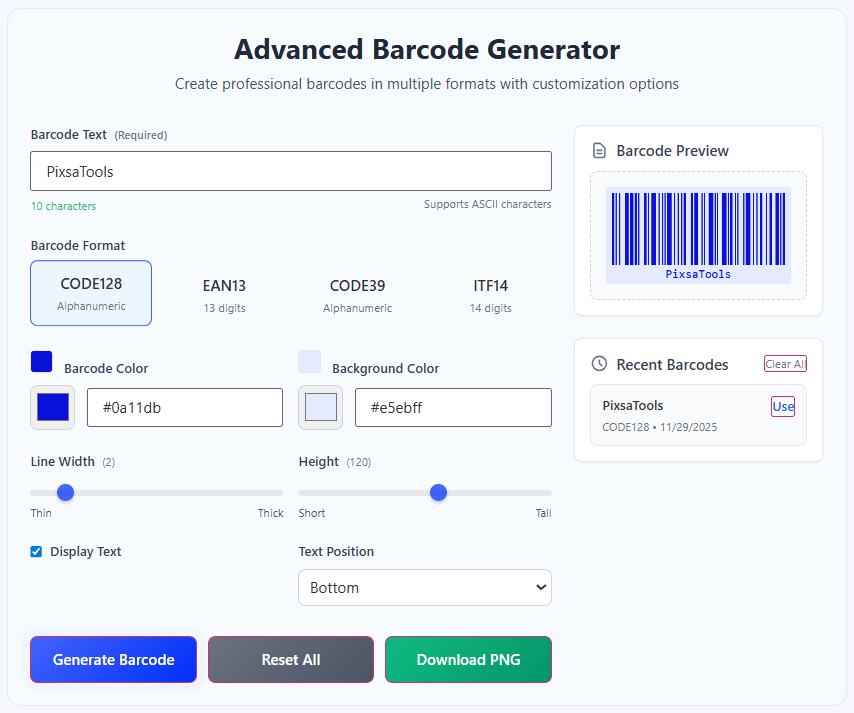
The Advanced Barcode Generator is a powerful, web-based tool designed to create professional barcodes in multiple formats with extensive customization options. This versatile utility supports industry-standard barcode formats and provides real-time preview capabilities for perfect barcode generation.
Unlike basic barcode generators, our tool offers four industry-standard formats with intelligent validation: CODE128 (alphanumeric), EAN13 (13-digit product codes), CODE39 (alphanumeric with limited symbols), and ITF14 (14-digit shipping codes). Each format includes automatic input validation and format-specific requirements.
This tool is essential for retail businesses, inventory managers, shipping departments, developers, and marketing professionals who need to generate barcodes for products, inventory tracking, shipping labels, or digital applications. Whether you're creating product labels, asset tags, or digital barcodes for scanning systems, our tool provides the precise control you need.
With its real-time preview, extensive customization options, color controls, and download capabilities, the Advanced Barcode Generator streamlines barcode creation workflows, saving time and ensuring professional results for both digital and print applications.
How to Use Our Barcode Generator
Enter Your Barcode Text
Type or paste your barcode data into the input field. The text can be numbers, letters, or a combination depending on the selected format. Character count updates in real-time, and format-specific hints guide you on valid input requirements for each barcode type.
Select Barcode Format
Choose the appropriate barcode format for your needs: CODE128 for general alphanumeric data, EAN13 for product codes, CODE39 for limited character sets, or ITF14 for shipping labels. Each format has specific requirements that are automatically validated as you type.
Customize Appearance
Adjust the visual properties of your barcode: Choose colors for both barcode lines and background, adjust line width and height for optimal scanning, control text display (show/hide barcode value), and set text position (top/bottom). All changes update the preview in real-time.
Generate and Download
Click "Generate Barcode" to create your barcode. The preview updates instantly. Use "Download PNG" to save the barcode as a high-quality PNG image for printing or digital use. Access recent barcodes from the history panel for quick reuse.
Barcode Formats Explained
Best Practices for Barcode Generation
- Use CODE128 format for maximum compatibility and character support
- For product sales, use EAN13 format with valid 13-digit product codes
- Ensure sufficient contrast between barcode color and background (dark on light works best)
- Maintain adequate quiet zones (empty space) on both sides of the barcode for reliable scanning
- For printing, use minimum line width of 2-3 pixels and sufficient height for the scanning distance
- Always test scan generated barcodes with your intended scanning equipment
- For color barcodes, ensure sufficient contrast - red scanners see red as black and some colors as white
Frequently Asked Questions
The main differences are: Character support - CODE128 supports all ASCII, EAN13 only numbers, CODE39 limited alphanumeric; Length requirements - EAN13 requires 12-13 digits, ITF14 exactly 14 digits; Use cases - EAN13 for retail products, CODE128 for general data, ITF14 for shipping; Scanning reliability - CODE128 has error correction, CODE39 is simpler but less dense; Industry standards - EAN13/ITF14 are ISO standards, CODE128 is de facto standard. Choose based on your specific needs: Retail → EAN13; Shipping → ITF14; General → CODE128; Legacy systems → CODE39.
Yes, but with important considerations. Most barcode scanners use red light, which means they see colors differently: Red appears black to scanners; Blue appears dark but scannable; Green appears light (may not scan well); White/light colors appear white (good for background). For reliable scanning: Use dark colors (black, dark blue, dark green) for bars; Use light colors (white, yellow, light gray) for background; Avoid red on white (scanner sees as white on white); Always test with your actual scanning equipment. Our tool's color preview helps visualize contrast, but physical testing is essential for production use.
Optimal size depends on scanning distance and printer resolution. General guidelines: Minimum line width - 0.25mm (0.01") for close scanning, 0.5mm (0.02") for general use; Height - 15-20% of width for standard barcodes, taller for poor scanning angles; Quiet zones - Minimum 2.5mm (0.1") on each side; Overall size - EAN13: 37.29mm × 25.93mm standard; CODE128: scale based on data length. For 300 DPI printing: Line width 3-5 pixels, Height 100-150 pixels. Use our width/height controls to adjust, then download and print a test sample to verify with your scanner.
Common scanning issues and solutions: Insufficient contrast - Ensure dark bars on light background; Missing quiet zones - Add empty space on both sides; Size too small - Increase dimensions, especially line width; Wrong format - Verify scanner supports your chosen format; Invalid data - Check format requirements (EAN13 needs 12-13 digits); Poor printing quality - Use high-resolution printing, avoid ink bleed; Damaged/modified barcode - Don't stretch or distort the image; Scanner issues - Test with multiple scanners. Our tool includes validation to prevent format errors, but printing/scanning conditions also affect reliability.
For internal use: Yes. For retail sales: Requires GS1 membership. Internal product barcodes (warehouse, inventory) can use any format. Retail product barcodes (EAN13/UPC) require GS1 company prefix and unique product numbers. Our EAN13 generator creates valid barcode structure but not legally licensed numbers. For commercial products: Obtain GS1 membership for legitimate EAN/UPC codes; Use our tool for testing/preview with your GS1 numbers; Never use random numbers for retail products (illegal and causes conflicts). For non-retail/internal use, you can generate any barcodes needed.
Quiet zones are blank spaces required before the start and after the end of a barcode. They're critical because: Scanner calibration - Scanners need clear space to detect barcode boundaries; Error prevention - Prevents adjacent graphics/text from being scanned as part of barcode; Standard requirement - All barcode specifications include quiet zone requirements; Size - Minimum 2.5mm (0.1") or 10x module width; Our tool includes - Built-in margins act as quiet zones in generated images. When designing labels: Never place text/graphics in quiet zones; Maintain zone integrity even when scaling; Increase zones for poor scanning conditions.
Our tool provides PNG format, which is ideal for most uses: PNG - Best for web use and printing, lossless compression, supports transparency, universally compatible; SVG - Vector format, infinitely scalable, smaller file size, but not all systems support; JPEG - Not recommended (lossy compression degrades barcodes); PDF - Best for professional printing but requires conversion. For most applications: Web/email - PNG; Print production - PNG at 300+ DPI; Large format printing - Consider SVG or high-res PNG; Mobile apps - PNG. Our PNG download maintains quality for both screen and print use.
Our web tool is designed for single barcode generation, but you can efficiently create multiple barcodes: Use the history feature - Generate and save barcodes for later access; Template approach - Keep same settings, change only the data; Export functionality - Each barcode downloads separately; For large batches - Consider API integration or dedicated barcode software. Tips for multiple barcodes: Standardize settings for consistency; Use sequential naming when downloading; Verify each barcode scans correctly; Consider automation for 100+ barcodes (our tool focuses on quality over batch quantity).
Maximum data lengths vary by format: CODE128 - Technically unlimited, but practically 20-30 characters for reasonable size; EAN13 - Exactly 12 or 13 digits (fixed length); CODE39 - No theoretical limit, but scanners typically read 20-30 characters; ITF14 - Exactly 14 digits (fixed length). Practical considerations: Longer barcodes require more horizontal space; Scanning reliability decreases with very long barcodes; Print constraints limit practical length; Our tool validates appropriate lengths for each format. For optimal results: Keep barcodes concise; Use minimal necessary data; Consider data compression for long information.
Most modern scanners support all our formats, but compatibility considerations: CODE128 - Nearly universal support, recommended for maximum compatibility; EAN13 - Supported by all retail scanners, some industrial scanners may need configuration; CODE39 - Widely supported but less common in retail; ITF14 - Specialized for shipping, supported by relevant scanners. Ensure: Scanner is configured for your chosen format; Test with actual hardware before mass production; Consider multi-format scanners if using different barcode types. Our tool follows ISO/IEC standards ensuring technical correctness, but scanner configuration and quality affect actual compatibility.