CHAT MOCKUP STUDIO
Instagram DM Generator
Build a conversation, preview it live, then export an image.
01 / BUILD YOUR CHAT
Conversation details
Appearance
Choose a chat themeContact profile
Shown at the top of the chatMessages
3 in this conversationChat footer
Small finishing details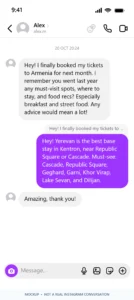
What is an Online Instagram DM Generator?
Ever wished you could recreate an Instagram DM conversation that never happened? Maybe you want to prank a friend who swears they "never said that", or you need a believable chat screenshot for a meme, a YouTube video, or a TikTok edit. The problem? Faking a DM the "real" way is a nightmare you'd need two accounts, two phones, matching profile pictures, and an endless back-and-forth of messages just to get one convincing screenshot.
That's exactly why we built this free Instagram DM Generator. It lets you create a complete Instagram Direct Message conversation from scratch right in your browser. No sign-up, no apps, no second phone. Just type your messages, choose who says what, and export the whole thing as a high-quality image in seconds.
Instagram introduced Direct Messages back in 2013, and today DMs are one of the platform's most-used features. With over 2 billion monthly active users, nearly everyone instantly recognizes what an Instagram chat looks like the purple gradient bubbles for sent messages, the soft gray bubbles for received ones, the tiny round avatar beside each incoming message, the timestamp separators between conversations. Those small details are what make a well-crafted fake DM feel real and genuinely funny.
Our Online Instagram DM Generator recreates the current Instagram iOS chat interface down to the smallest detail. You get the full header with contact name and icons, properly spaced message bubbles, date dividers, typing indicators, and even the camera button and input field at the bottom. Both light mode and dark mode are fully supported, so your fake conversation matches whatever theme the person you're pranking actually uses.
The best part? Everything happens locally in your browser. Nothing is uploaded, nothing is stored, no login required. Type it, preview it, download it done.
How to Use Our Instagram DM Generator
Creating a fake Instagram DM takes less than a minute. Here's the step-by-step:
Choose Your Theme
Start by picking light mode or dark mode to match the look you want. Dark mode is especially popular for realistic screenshots.
Add the Sender's Profile
Enter the username, display name, and choose a profile picture (or upload your own). The avatar appears next to every incoming message, just like the real Instagram app.
Write Your Messages
Type each message in the chat. Choose who sends it — you or the other person. You can add as many messages as you want and mix sent and received bubbles freely.
Customize the Details
Add timestamps, date separators, typing indicators, or a "Seen" status to make the conversation look more authentic.
Preview & Download
Preview your chat in real time, then download it as a high-quality PNG image. No watermark, no signup, ready to post.
💡 Pro tip: Use the "Add date separator" button to insert timestamp dividers between message groups — this makes the conversation look much more realistic.
Who Is This Instagram DM Generator For?
- Content creators – build funny chat mockups for YouTube videos, TikToks, and Reels
- Meme page owners – create viral-worthy fake DMs without any design skills
- Pranksters – prank friends with realistic conversations that look 100% real
- Social media marketers – design testimonial-style DMs for ads and campaigns
- Video editors – generate chat screenshots for storytelling, tutorials, or explainer videos
- Students & teachers – use fake chats as visual aids in presentations
Whether you're making a one-off prank or building a content series, our fake Instagram DM maker gives you full control — no Photoshop, no design experience, no second phone.
Features of Our Instagram DM Generator
Our online Instagram DM generator comes packed with everything you need to create convincing conversations:
- Dark mode & light mode – match the exact Instagram theme
- Custom avatars – upload your own profile picture or pick from presets
- Sent & received bubbles – mix messages freely between both sides
- Typing indicator – simulate a live conversation with animated typing dots
- Timestamps & date separators – add realistic time markers
- "Seen" status – make the conversation look complete
- Emoji support – full emoji keyboard integration
- High-quality PNG export – download a crisp image ready for any platform
- 100% browser-based – no install, no signup, no server upload
- Mobile-friendly – works on desktop, tablet, and phone
Fake Instagram DM Ideas for Every Occasion
Not sure what conversation to create? Here are some ideas to get you started:
😂 Funny Prank DMs
- A conversation where a celebrity "confesses" something
- A friend "agreeing" to pay for dinner
- A fake breakup text with a twist
📱 Content Creator Mockups
- Testimonial-style DMs from "happy customers"
- Fan messages for a video intro
- Comment-style chats for reaction videos
🎬 Storytelling Screenshots
- A dramatic conversation for a short film
- A "receipt" screenshot for a debate video
- A mock support chat for a tutorial
💼 Business & Marketing
- Client conversations for portfolio proof
- Support chat mockups for SaaS demos
- Influencer outreach DMs for case studies
Pro Tips for Realistic Fake DMs
- Match the theme to the story – If the "other person" uses dark mode, use dark mode. If they use light mode, use light mode.
- Add small imperfections – Real chats have typos, short replies, and gaps. Add a "haha" or "lol" to feel authentic.
- Use realistic usernames – Avoid "user123" — pick something believable.
- Add timestamps – Even one timestamp at the top makes it feel real.
- Don't overdo the emojis – Real DMs don't have 10 emojis per message.
- Use the typing indicator – It creates the illusion of an active conversation.
- Download in high resolution – Blurry screenshots look fake instantly.
Frequently Asked Questions
An Instagram DM Generator is a free online tool that creates realistic fake Instagram Direct Message conversations. You can customize usernames, avatars, message text, themes, and timestamps, then download the result as a high-quality image.
Yes — 100% free. No signup, no credit card, no watermark, and no download limits. You can create as many fake conversations as you want.
Yes. Our Instagram DM Generator dark mode replicates the exact look of Instagram's dark theme, including the black background, purple bubbles, and gray received messages.
Absolutely. This is exactly what the tool is designed for. Create any conversation — one-on-one DMs, group chats, message requests — and download them as realistic screenshots.
No. You don't need any Instagram account at all. The generator creates everything from scratch — usernames, avatars, and messages are all fictional and fully customizable.
Yes. You can upload a custom profile picture for the sender, or choose from preset avatars. The image appears next to every incoming message, matching Instagram's real layout.
No. All conversations are created and rendered locally in your browser. Nothing is uploaded, stored, or shared. Your fake DMs stay 100% private.
Yes. The tool is built for content creators, meme pages, and social media marketers. Download your fake DM and use it in YouTube videos, TikToks, Reels, or anywhere else.
Yes. Our online Instagram DM generator works perfectly on phones, tablets, and desktop computers. No app install required.
Yes. Our generator supports one-on-one DMs, message requests, and group chat layouts — perfect for creating more complex fake conversations.
Very realistic. We replicate the current Instagram iOS interface, including header, bubbles, avatars, timestamps, and typing indicators. Combined with the right theme and details, most people can't tell the difference.
The tool is intended for entertainment, content creation, and parody purposes. Please don't use it to deceive, harass, or harm others, or to impersonate real people. Use responsibly — see our Usage Policy below.
Usage Policy
Pixsa Tools is not responsible for the images generated by users. By using the Instagram DM Generator on Pixsa Tools, you agree to use our tool lawfully and ethically, in accordance with the following rules:
- No harmful content. You do not use generated Instagram DM images to create content with ill intent — including but not limited to harassing, attacking, inciting violence, slandering, threatening, disparaging, intimidating, or otherwise hurting other people or entities.
- No dangerous misinformation. You do not use generated Instagram DM images to spread false information that could negatively affect human life.
- No false claims of authenticity. You do not present generated Instagram conversations as fact. The main intent of this tool is having fun by making playful jokes — not misleading people.
- Always disclose. You make it obvious to any viewers that Instagram conversations generated by this tool are not original or genuine.
By continuing to use this Instagram DM Generator, you acknowledge and accept these terms. Pixsa Tools reserves the right to update this policy at any time.