

What is an Image Resolution Checker?
An Image Resolution Checker is a free online tool that analyzes your image files and reveals their exact technical details width and height in pixels, megapixels, aspect ratio, DPI (dots per inch), and the resulting print size. Instead of guessing whether your image is high enough quality for print, social media, or a website, this tool gives you accurate answers in seconds.
Our image resolution checker reads the metadata stored inside your files including JFIF, EXIF, and PNG pHYs chunks to show you the true DPI value, not just an estimate. You'll also see how your image compares against common requirements like Full HD 1080p, Instagram posts, YouTube thumbnails, A4 print at 300 DPI, and more.
Whether you're a photographer preparing files for print, a web designer checking image quality, or a content creator making sure your thumbnails meet platform standards, this picture resolution checker gives you the accuracy you need without uploading anything to a server.
Everything runs locally in your browser. Your images never leave your device, which makes this the safest online image resolution checker available.
How to Use Our Image Resolution Checker
Drop Your Images
Drag and drop one or more image files into the tool, or click "Choose files" to browse. You can also paste images with Ctrl/⌘ + V.
Choose a Target
Select a preset (Website hero, Instagram post, A4 print, etc.) or create a custom rule with your own minimum dimensions.
Review the Results
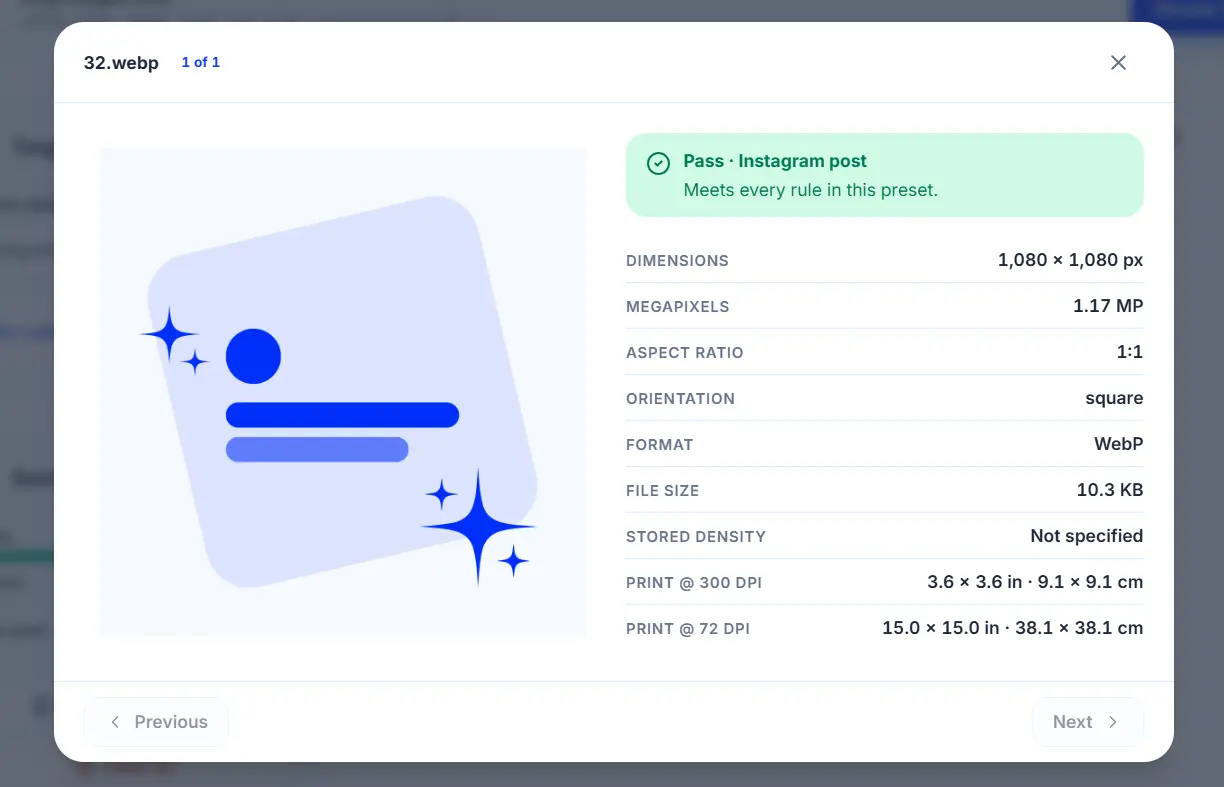
Each image gets a Pass / Check / Too Small verdict. Click any image to see detailed dimensions, DPI, aspect ratio, orientation, and print size at different DPI values.
Compare Against Standards
See instantly whether your images meet web, social, or print requirements no math needed.
Export a Report
Download a CSV report with all image details for your records or to share with a client.
How to Check Image DPI Online
DPI (dots per inch) determines how large an image will print at a given physical size. A 3000×2000 image at 300 DPI prints at 10×6.67 inches but the same image at 72 DPI prints at 41×27 inches with much lower quality. Our image DPI checker reads the actual DPI stored in your file and shows you:
- Stored DPI – what the file says (from JFIF, EXIF, or pHYs metadata)
- Print size at 300 DPI – the standard for high-quality print
- Print size at actual DPI – what you'd get at the file's native density
This is essential for photographers, print shops, and anyone preparing files for physical products.
Who Is This Image Resolution Checker For?
- Photographers – verify print quality before sending to a lab
- Web designers – check image dimensions for retina and 4K displays
- Content creators – make sure YouTube thumbnails, Instagram posts, and OG images meet platform standards
- Print shops – verify customer files before printing
- E-commerce sellers – ensure product photos meet marketplace requirements
- Students & teachers – check image quality for presentations and documents
- Social media managers – test image sizes for every platform
Whether you need a quick photo resolution checker for one image or a batch picture resolution checker for dozens of files, this tool handles both.
Understanding Image Resolution
Image resolution is measured in pixels — the small squares that make up a digital image. The more pixels, the higher the resolution and the more detail the image can hold.
| Term | What It Means |
|---|---|
| Pixels | Width × height (e.g., 1920×1080) |
| Megapixels (MP) | Total pixels ÷ 1,000,000 |
| Aspect Ratio | Proportional relationship (e.g., 16:9) |
| DPI | Dots per inch for print |
| PPI | Pixels per inch for screens (same as DPI in practice) |
High-resolution images look sharp at any size. Low-resolution images look pixelated or blurry when enlarged. Our image quality checker helps you spot this instantly.
Pro Tips
- For web, aim for 72–150 DPI — higher is unnecessary and hurts loading speed.
- For print, always use 300 DPI at the final print size.
- For social media, use the platform's native resolution (Instagram: 1080×1080, YouTube: 1280×720).
- For OG images (social sharing), use 1200×630 px.
- For retina displays, use 2× the CSS pixel size (e.g., 2× for @2x images).
- Batch-check multiple images at once — perfect for photographers preparing a print batch.
Frequently Asked Questions
An Image Resolution Checker is a free tool that analyzes your image files and shows you their exact dimensions (in pixels), megapixels, aspect ratio, DPI, and print size. You can also compare them against common web, social, and print standards.
Yes — 100% free. No signup, no credit card, no upload limits. You can check as many images as you want.
Drop your image into the tool. Our image DPI checker reads the DPI value stored in the file's metadata (JFIF, EXIF, or PNG pHYs) and displays it. If no DPI is stored, the tool tells you and shows print sizes at the standard 300 DPI.
DPI (dots per inch) is used for print. PPI (pixels per inch) is used for screens. In practice, the terms are often used interchangeably. Our tool shows both.
300 DPI is the standard for high-quality print (photos, documents, brochures). For large posters, 150 DPI is acceptable. For web, 72 DPI is fine. This photo resolution checker helps you verify your files meet these standards.
No. Everything runs locally in your browser. Your images never leave your device. That's why we call it a 100% private image resolution checker.
Yes. Drop up to 60 images at once. The tool analyzes them all in parallel and shows you a summary of pass/fail against your chosen requirement.
JPEG, PNG, WebP, AVIF, GIF, SVG, BMP, and TIFF. DPI metadata is read from JPEG and PNG files. Other formats display dimensions and file size only.
- Instagram post: 1080×1080 px
- Instagram story/reel: 1080×1920 px
- YouTube thumbnail: 1280×720 px
- Facebook post: 1200×630 px
- LinkedIn banner: 1584×396 px
- Twitter/X image: 1200×675 px
Our picture resolution checker includes presets for all of these.
Yes. Select a print preset (A4, A5, 4×6 photo, poster) and the tool tells you if your image meets the 300 DPI (or 150 DPI for posters) requirement. If not, it shows exactly how many pixels you're short.
Some apps (like Photoshop) store DPI metadata when saving, while others (like web browsers) strip it. Our tool reads the actual stored value. If no DPI is stored, it defaults to 72 DPI for print calculations, which you can override.
Yes. No data is uploaded, no cookies are set, no analytics track your images. The tool is entirely client-side and privacy-first.