

RGB to Hex Converter
What is Advanced RGB to Hex Converter?
The Advanced RGB to Hex Converter is a sophisticated web-based tool designed to convert colors between RGB (Red, Green, Blue) and hexadecimal (HEX) color formats with precision and real-time feedback. This powerful utility provides intuitive controls, color visualization, and additional color format outputs to streamline color conversion workflows for designers and developers.
Unlike basic conversion tools, our converter offers dual input methods (sliders and numeric inputs), real-time color preview, multiple color format outputs, and preset color options. It enables seamless conversion between RGB values (0-255 for each channel) and HEX color codes (# followed by six hexadecimal digits), making it perfect for web development, graphic design, and digital color manipulation.
This essential tool is built for web developers, UI/UX designers, graphic artists, digital marketers, and anyone working with digital colors. Whether you're converting design specifications to code, adjusting color values for web implementation, or learning about color representation, our RGB to Hex Converter provides the accuracy and usability needed for professional color work.
With its instant conversion, visual feedback, copy functionality, and comprehensive color information, the Advanced RGB to Hex Converter transforms complex color mathematics into an accessible, efficient interface that bridges the gap between design intent and digital implementation.
How to Use Advanced RGB to Hex Converter
Adjust RGB Values
Use the sliders or numeric inputs to set values for Red, Green, and Blue channels (each ranging from 0-255). The tool provides real-time visual indicators for each channel and updates the color preview instantly as you make adjustments.
View Real-time Conversion
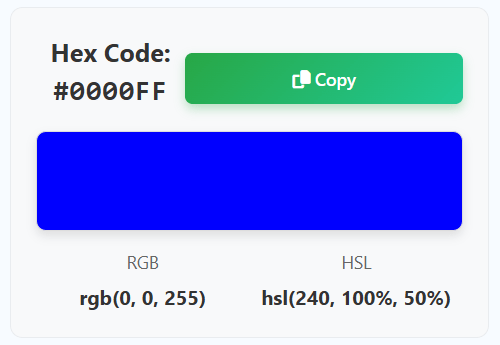
Watch as the tool automatically converts RGB values to hexadecimal format in real-time. The resulting HEX code appears immediately alongside a visual color box that shows exactly how the color will appear.
Explore Additional Formats
Beyond HEX conversion, view the color represented in RGB format (your input values) and HSL format (Hue, Saturation, Lightness). This multi-format display helps you understand color relationships across different color models.
Copy and Use Results
Copy the HEX code to clipboard with one click for immediate use in your CSS, HTML, or design software. Use preset colors for common colors or save time with frequently used color values.
Key Features
Color Formats Explained
Pro Tips for Effective Color Conversion
- When converting design specifications to code, use the numeric inputs for precise RGB values from design software
- Use the sliders for exploratory color adjustment when you want to see how changing values affects the resulting color
- For web accessibility, check that your HEX colors provide sufficient contrast (minimum 4.5:1 for normal text)
- Remember that RGB values are additive - combining red, green, and blue light creates different colors
- When working with CSS variables or design tokens, use the copied HEX codes directly in your stylesheets
- Use HSL format understanding to create color variations - adjust hue for different colors, saturation for intensity, lightness for brightness
- For consistent color across projects, save commonly used HEX codes in a reference document or design system
- When converting brand colors to digital, verify the converted HEX code matches the original brand color specifications
- Use preset colors as starting points for creating color schemes or testing color combinations
- Always test converted colors in your target application to ensure they render correctly across different devices
Frequently Asked Questions
RGB (Red, Green, Blue) and HEX (Hexadecimal) are two different representations of the same color information: RGB format uses three decimal numbers (0-255) for red, green, and blue channels. Example: rgb(255, 0, 0) for pure red. HEX format uses a six-digit hexadecimal code preceded by #. Example: #FF0000 for pure red. The conversion is mathematical: Decimal to hexadecimal - each RGB value (0-255) converts to two hex digits (00-FF); Direct correspondence - #RRGGBB where RR=red hex, GG=green hex, BB=blue hex; Usage differences - RGB is often used in programming and design software, HEX is standard for web development and CSS. Both represent the same 16.7 million colors in the RGB color space.
Manual conversion from RGB to HEX involves these steps: Step 1 - Take each RGB value (0-255); Step 2 - Convert each decimal value to hexadecimal (0-9, A-F); Step 3 - Ensure two digits for each (add leading zero if needed); Step 4 - Combine with # prefix. Example conversion: RGB(18, 150, 230) → Red: 18 = 12 in hex → "12"; Green: 150 = 96 in hex → "96"; Blue: 230 = E6 in hex → "E6"; Result → #1296E6. Common conversions: 255 → FF; 128 → 80; 0 → 00. While manual conversion is educational, our tool provides instant, accurate conversions without the mathematical work.
HSL (Hue, Saturation, Lightness) is a color model that represents colors in a more intuitive way: Hue - the actual color (0-360° on color wheel); Saturation - color intensity (0%=gray, 100%=full color); Lightness - brightness (0%=black, 100%=white). HSL is useful because: Human intuition - easier to understand than RGB values; Color manipulation - changing hue rotates around color wheel, saturation adjusts intensity, lightness controls brightness; Color relationships - complementary colors are 180° apart, analogous colors are close in hue; CSS support - modern CSS supports hsl() function directly. Our tool shows HSL values alongside RGB and HEX to help you understand color relationships and make intuitive adjustments.
While our current implementation focuses on RGB to HEX conversion, the reverse conversion (HEX to RGB) follows the same principles: HEX to decimal - each pair of hex digits converts to decimal 0-255; Example - #3A7BD5 → Red: 3A (hex) = 58 (decimal); Green: 7B = 123; Blue: D5 = 213 → rgb(58, 123, 213). The tool shows RGB values as you adjust them, effectively providing both conversion directions. For dedicated HEX to RGB conversion: Input HEX directly - future enhancements may include HEX input; Current workflow - adjust RGB sliders until HEX matches your target; Visual verification - color preview shows exact color match. The mathematical relationship is symmetrical, so understanding one conversion helps with the other.
Valid RGB values follow these ranges and constraints: Individual channels - each must be an integer between 0 and 255 inclusive; Total combinations - 256 × 256 × 256 = 16,777,216 possible colors; Boundary values - 0 = no color, 255 = maximum intensity; Common combinations - (0,0,0)=black, (255,255,255)=white, (255,0,0)=red, etc. Our tool enforces these ranges: Input validation - numeric inputs restrict to 0-255; Slider limits - sliders only move within valid range; Error handling - invalid inputs show clear error messages; Real-time feedback - visual indicators show when values are at minimum or maximum. These ranges correspond to 8-bit color depth per channel, standard for most digital color applications.
HEX codes are preferred in web development for several practical reasons: Compactness - #RRGGBB is shorter than rgb(R,G,B); Consistency - HEX is standard across all browsers and CSS specifications; No ambiguity - HEX always represents exact color, while rgb() might have optional spaces or percentage formats; CSS performance - marginally faster parsing in some browsers; Design tool compatibility - design software exports HEX by default; Community convention - HEX is the established standard in web development. However, both work: CSS support - both rgb() and #hex are fully supported; Conversion ease - tools like ours make conversion trivial; Modern alternatives - CSS also supports hsl() and rgba() for transparency. For maximum compatibility and convention, HEX remains the web standard.
The color conversion is mathematically precise with these accuracy characteristics: Mathematical precision - uses exact decimal-to-hexadecimal conversion algorithms; No approximation - each RGB value converts directly to two hex digits without rounding; Integer handling - maintains exact integer values throughout conversion; Boundary accuracy - correctly handles minimum (0) and maximum (255) values; Full range support - all 16.7 million RGB colors convert accurately. The conversion follows this exact process: Decimal to hex - uses JavaScript's toString(16) method with padding; Case consistency - produces uppercase HEX codes (standard convention); Format validation - ensures proper #RRGGBB format; Cross-verification - multiple display formats (RGB, HEX, HSL) all derive from same source values. For all practical purposes, the conversion is 100% accurate for digital color representation.
Absolutely! Converted colors work directly in CSS and HTML: CSS usage - use HEX codes in color, background-color, border-color, etc.; HTML usage - use in style attributes or with CSS classes; Modern frameworks - compatible with React, Vue, Angular, etc.; Example CSS: color: #3A7BD5; or background-color: #FF5733;; Example HTML: <div style="color: #3A7BD5;">. The tool provides: Copy functionality - one-click copy to clipboard for immediate pasting; Correct format - produces standard #RRGGBB format expected by browsers; Validation - ensures all HEX codes are valid for web use; Visual preview - shows exactly how color will appear in browser. Simply copy the HEX code and paste it into your CSS or HTML files.
The preset colors provide quick access to common, frequently used colors: Primary colors - Red (#FF0000), Green (#00FF00), Blue (#0000FF); Secondary colors - Yellow (#FFFF00), Magenta (#FF00FF), Cyan (#00FFFF); Neutrals - Black (#000000), White (#FFFFFF). Use presets for: Quick testing - rapid color checking in designs; Learning tool - see how primary colors convert; Starting points - begin with a primary color and adjust from there; Common needs - frequent colors like black, white, primary colors; Color theory exploration - see relationships between primary and secondary colors. Each preset: Sets exact RGB values - corresponding to the standard color; Shows conversion - demonstrates RGB to HEX conversion for that color; Provides visual reference - shows standard color appearance. Presets save time and provide educational reference points.
Yes! The tool is fully responsive and mobile-friendly with these mobile optimizations: Responsive design - adapts to all screen sizes from desktop to smartphone; Touch-friendly controls - sliders and buttons sized for touch interaction; Mobile layout - optimized vertical layout for narrow screens; Performance optimized - works smoothly on mobile devices; Mobile browser compatibility - works in Chrome, Safari, Firefox on iOS and Android. Mobile features: Touch sliders - easy adjustment with finger dragging; Virtual keyboard - numeric inputs work with mobile keyboards; Mobile copy functionality - clipboard access works on modern mobile browsers; Gesture support - works with touch gestures without interfering with page scrolling. Whether you're on a computer, tablet, or smartphone, the tool provides a consistent, usable experience.