

What is a Free Invoice Generator?
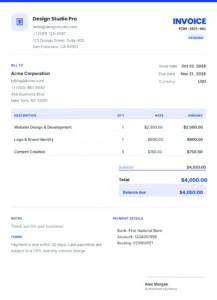
A free invoice generator is an online tool that lets you create professional invoices without accounting software, subscriptions, or design skills. Instead of building an invoice from scratch in Word or Excel, you enter your business details, client information, and line items and the tool generates a polished invoice you can download and send in seconds.
Our invoice generator runs entirely in your browser. There's no signup, no watermark, and no hidden fees. You can add your logo, choose a currency, apply tax and discounts, add payment terms, and even draw a signature all without leaving the page. When you're done, download your invoice as a PDF or PNG, print it, or email it to your client.
Whether you're a freelancer billing a client, a small business owner invoicing customers, or a contractor sending estimates, this free invoice maker gives you everything you need without the cost or complexity of traditional invoicing software.
Because everything runs locally in your browser, your financial data never touches our servers. That makes this one of the most private online invoice generators available today.
How to Create an Invoice Online Free
Add Your Business Details
Enter your business name, email, phone, address, and upload your logo. These details save automatically for future invoices.
Add Your Client
Fill in the client's name, email, phone, and billing address. You can save multiple clients by duplicating invoices.
Set Invoice Details
Choose your invoice number, issue date, due date, and currency. We support 38+ currencies including USD, EUR, GBP, and more.
Add Line Items
Describe each service or product, then set the quantity and rate. Totals calculate automatically as you type.
Apply Tax & Discounts
Add tax percentage, discounts (percentage or fixed amount), shipping charges, and any amount already paid.
Customize the Design
Choose from 3 templates (Modern, Classic, Minimal), pick an accent color, and draw your signature.
Download or Print
Export as a high-quality PNG, print to PDF, or save for later. Everything stays saved in your browser.
💡 Pro tip: Use the "Duplicate" button to create recurring invoices for repeat clients invoice number and dates update automatically.
Who Is This Invoice Generator For?
- Freelancers – bill clients for design, writing, development, or consulting work
- Small businesses – invoice customers without paying for accounting software
- Contractors – send estimates, invoices, and receipts in minutes
- Consultants – create professional invoices for hourly or project work
- E-commerce sellers – generate order invoices for marketplace sales
- Photographers – invoice clients for sessions, prints, and licensing
- Tutors & coaches – bill students monthly without complex software
- Startups – create investor-friendly invoices while you scale
Whether you need one invoice a month or fifty, this free invoice maker scales with you no monthly fee, no seat limits, no export caps.
Features of Our Invoice Generator
Our online invoice generator includes everything you need to look professional:
- 38+ currencies – USD, EUR, GBP, JPY, AED, and more
- Custom logo – upload your brand logo once, reuse it forever
- Multiple templates – Modern, Classic, and Minimal layouts
- Custom accent colors – 8 presets + custom color picker
- Tax & discounts – percentage or fixed amount, with auto-calculated totals
- Amount paid tracking – deposits and partial payments reduce the balance
- Invoice status – Draft, Pending, Paid, or Overdue
- Digital signature – draw your signature with a mouse or finger
- Payment details – add bank account, routing, or payment instructions
- Notes & terms – include custom notes and terms on every invoice
- PNG export – download a high-resolution image
- Print to PDF – use your browser's print dialog to save as PDF
- Autosave – everything saves automatically in your browser
- No watermark – your invoices look 100% professional
- 100% private – no upload, no account, no tracking
Free Invoice Maker vs Paid Invoicing Software
| Feature | Our Free Generator | Paid Software |
|---|---|---|
| Cost | Free forever | $10–$50/month |
| Signup required | No | Yes |
| Watermark | No | Sometimes |
| Unlimited invoices | Yes | Usually capped |
| Custom logo | Yes | Usually yes |
| Multi-currency | 38+ | Usually 10–20 |
| Data privacy | 100% browser | Cloud-stored |
| Tax & discounts | Yes | Yes |
| Signature | Yes | Usually yes |
For freelancers and small businesses sending a handful of invoices per month, a free invoice generator is often all you need. If you need recurring billing, expense tracking, or multi-user access, paid software makes sense but for most people, this free invoice maker covers 90% of the use case.
Pro Tips for Professional Invoices
- Use sequential invoice numbers – INV-2026-001, INV-2026-002, etc.
- Always include a due date – 30 days is standard; 15 days for premium clients.
- Add payment terms – Specify late fees upfront to avoid disputes.
- Include a logo – Invoices with a logo get paid 2× faster (studies show).
- Send as PDF – PDFs are universally accepted and print cleanly.
- Keep a copy – Download and archive every invoice for tax purposes.
- Use the "Amount paid" field – Track deposits and partial payments.
- Add a thank-you note – A small "Thank you for your business!" improves relationships.
Frequently Asked Questions
Yes — 100% free, forever. No signup, no credit card, no watermark, and no limits on how many invoices you create.
No. The tool works entirely in your browser without any account. Your invoices are stored locally on your device.
Click "Print / PDF" your browser's print dialog will open, where you can select "Save as PDF" as the destination. Alternatively, click "Download PNG" to get a high-resolution image.
Yes. Upload a PNG, JPG, or SVG logo (up to 1 MB), and it appears on every invoice you create. You only need to upload it once.
38+ currencies including USD, EUR, GBP, CAD, AUD, JPY, CNY, INR, AED, SAR, and more. You can change currency for each invoice.
Yes. Add a tax rate (percentage), a discount (percentage or fixed amount), shipping charges, and any amount already paid. Totals calculate automatically.
Scroll to "Design & signature" and draw your signature with a mouse, finger, or stylus. It appears on every invoice where the signature block is enabled.
Yes — 100% private. Everything runs in your browser. Your data never leaves your device and is never sent to our servers.
Yes. Click "Duplicate" to copy an invoice — the number, dates, and status reset automatically, but your client and line items stay.
Yes. The tool is fully responsive and works on phones, tablets, and desktops. You can even draw signatures with your finger on mobile.
Absolutely. It's used by freelancers, small businesses, consultants, contractors, and e-commerce sellers. For most invoicing needs, this free invoice maker is all you need.
No. Create as many invoices as you want — free, forever.
Because everything is stored in your browser, clearing your browser data will delete your invoices. We recommend downloading each invoice as a PDF after creating it, or duplicating your invoices if you need to keep records.