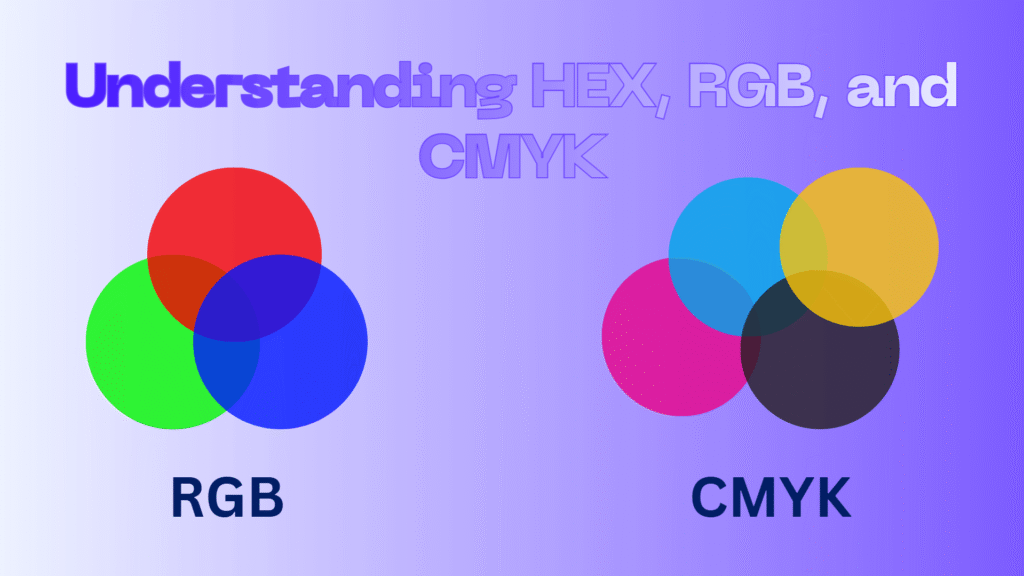
You’re at your design desk, staring at a critical project on your monitor. The client wants the exact shade they saw in the sample, but something’s off. On screen, it’s vivid and alive; in print, it feels flat and lifeless.
This is where color codes become your secret weapon. HEX, RGB, and CMYK each tell a different story, guiding you through the digital glow of screens and the subtle chemistry of inks.
Understanding HEX, RGB, and CMYK doesn’t just improve your designs, it gives you complete control over every hue and shade. Ready to unlock the hidden world of colors? Keep reading to discover how to master them fully.
What Are HEX, RGB & CMYK Color Spaces?
Color spaces are systems used to represent colors in digital or physical media, providing a structured way to define, reproduce, and communicate them. Color codes are the backbone of these spaces, allowing designers to specify exact hues and shades with precision.
Understanding HEX, RGB, and CMYK and using the right color space ensures your work maintains visual integrity across screens, prints, and various devices. Here’s why they are essential:
- Guarantee consistency across digital and printed media
- Allow precise communication between designers, clients, and printers
- Enable advanced color manipulation and conversion between formats
- Help maintain brand identity through consistent color usage
- HEX Color Code
HEX color codes are hexadecimal representations of colors used primarily in web design and digital graphics. Each color is expressed as a six-digit combination of numbers (0-9) and letters (A-F), representing the red, green, and blue components of the color.
For example, #FF5733 corresponds to a vivid orange hue, where FF is red, 57 is green, and 33 is blue.
Applications and importance
- Widely used in web development to define exact colors in HTML, CSS, and design tools.
- Essential for digital branding to maintain consistent colors across websites and applications.
- Can be easily converted to other formats, such as RGB or CMYK, through Hex to RGB conversion tools.
- Supports over 16 million color possibilities, allowing designers unmatched flexibility in creating precise digital visuals.
- RGB Color Code
The RGB color model represents colors through the additive combination of red, green, and blue light. Each component ranges from 0 to 255, producing millions of possible shades.
RGB is foundational for digital displays like monitors, smartphones, and TVs, as these devices emit light rather than reflecting it.
Applications and importance
- Crucial for web design, app development, and digital art, where screen-based colors dominate.
- Enables smooth gradients, transparency, and dynamic lighting effects in digital graphics.
- Provides the basis for RGB vs CMYK comparisons when translating digital designs to print.
- Supports color manipulation and accurate Hex to RGB conversion, bridging the gap between digital and print design workflows.
- CMYK Color Code
CMYK color codes define colors through a subtractive model using Cyan, Magenta, Yellow, and Key (Black).
Unlike RGB, which adds light, CMYK subtracts light from a white background, making it ideal for printing processes. Each value ranges from 0% to 100%, determining ink density for the final output.
Applications and importance
- Essential for professional printing, including brochures, packaging, and marketing materials.
- Maintains accuracy in CMYK printing process, ensuring colors on paper match design expectations.
- Facilitates RGB to CMYK formula conversions for designs initially created digitally.
- Often works alongside pantone colors for consistent brand identity and precision in color matching.
Color conversion between different spaces is not always perfectly accurate. For instance, using an RGB to CMYK formula to prepare files for print may result in some colors falling outside the CMYK gamut, requiring manual adjustments.
This process, known as gamut mapping, ensures that the final printed colors remain as close as possible to the original digital design. Awareness of these limitations helps designers anticipate potential color shifts and maintain brand consistency across both digital and print media.
Beyond technical codes, applying principles of contrast, harmony, and balance ensures aesthetically pleasing results.

What is the Difference Between HEX, RGB & CMYK?
Choosing the right color system is more than a technical decision, it’s about ensuring your visuals translate correctly across platforms. Understanding the differences between color codes helps designers maintain consistency in both digital and printed materials.
Each model has unique characteristics that influence workflow, color conversion, and output quality. Understanding the relationships between RGB, HEX, and CMYK allows seamless workflow transitions from digital drafts to printed outcomes.
| Feature | HEX Color Codes | RGB Color Model | CMYK Color Codes |
| Type | Hexadecimal value | Additive color (light) | Subtractive color (ink) |
| Primary Use | Web design, digital graphics | Screens, monitors, digital art | Printing, packaging, physical media |
| Color Range | | ~16.7 million colors | ~16.7 million colors | Limited gamut, some bright colors cannot be reproduced |
| Format Example | #1E90FF | Rgb (30,144,255) | Cmyk (88%,44%,0%,0%) |
Advantages | Precise web color control, easy conversion | Accurate digital representation, ideal for light-based media | Optimized for print, reliable for ink-based reproduction |
| Conversion Notes | Easy Hex to RGB conversion | Can be converted to CMYK using RGB to CMYK formula | Often requires adjustments for bright digital colors |
| Best For | Web designers, UI/UX developers | Digital artists, game designers | Print designers, packaging specialists |
| Brand Consistency | High online consistency | Screen-based brand assets | Critical for physical product branding |
Digital vs Print Colors
One common challenge designers face is translating vibrant digital colors into print accurately. Digital vs print colors often differ because screens emit light while printed materials reflect it. Understanding these variations and using the right color codes prevents unexpected results.
Every color space has limitations in the range of colors it can represent, known as the color gamut. This means that some vibrant hues visible on screens using RGB or HEX cannot always be reproduced accurately in print with CMYK.
Understanding these limitations explains why colors may appear differently between digital and printed outputs and highlights the importance of selecting the appropriate color space for each project.
Mastering color gamut ensures that your designs maintain visual fidelity, whether for web, digital media, or printed materials.
Proper color conversion from RGB or HEX to CMYK ensures printed materials maintain visual integrity, while attention to color matching in design maintains brand consistency across all media.
Finally
Mastering color codes is a foundational skill for any designer, whether digital or print-focused. HEX, RGB, and CMYK each serve unique roles, offering precision, flexibility, and consistency in their respective domains.
Ready to take your color knowledge to the next level? Share your thoughts, test your skills, or get personalized advice; which color model do you use most in your projects? Tell us why! Have you ever faced issues with digital vs print colors? Try a quick HEX to RGB conversion challenge and comment your results.